‹ Guides
Guide 7 of 8
Use the phone app
Scan and write CFS tags with your Android phone, on its own or paired with Spoolhouse on your computer.
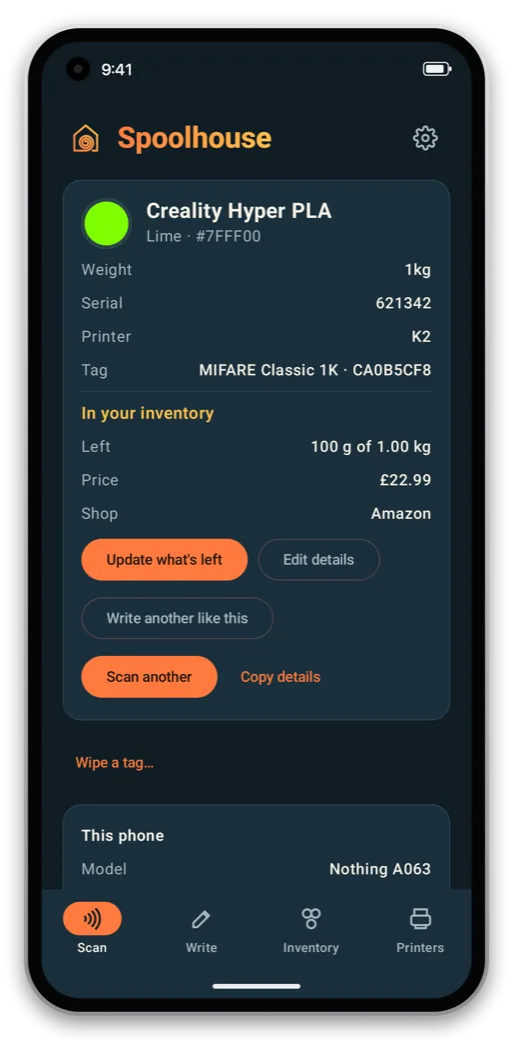
Spoolhouse for Android reads and writes CFS tags with the phone's NFC. Hold a spool to the phone to see what it is and what's left on it.
It needs an Android phone whose NFC supports MIFARE Classic tags (most with an NXP chip). The app checks when it first opens and tells you. The inventory and printers work on any Android phone.
Choose how you'll use it
The first time it opens, the app asks:
- On this phone: everything lives on the phone, with no computer needed. It reads your printer when you're on the same Wi-Fi.
- With Spoolhouse on your computer: the computer keeps your inventory and the phone is a window onto it. The computer takes each print's filament off exactly the right spools as it prints.
You can switch later in the app's Settings.
Pair it with your computer
- On the computer, open Settings → Phone access and click Pair a phone…. It shows a QR code.
- In the phone app, choose Connect to your computer and scan the code.
The phone and computer need to be on the same Wi-Fi. They talk directly and encrypted, and only paired phones can connect. Changes you make while you're out sync when you're back.